Unreal Engine 5.4 Shader Optimization Guide for 2026 Games

Advertisements
Latest developments on Unreal Engine continue shaping the gaming and real-time graphics industry in the United States as developers increasingly focus on performance optimization, AI-assisted workflows, and next-generation rendering technologies. Epic Games has continued expanding Unreal Engine 5 capabilities, with Unreal Engine 5.4 receiving attention for improvements tied to rendering efficiency, animation systems, and large-scale world creation.
The demand for high-fidelity graphics in modern gaming is pushing studios to prioritize shader optimization strategies capable of balancing visual quality with stable performance across PC and console platforms. Industry experts say Unreal Engine 5.4 introduces workflow enhancements that help developers reduce shader compilation bottlenecks, improve GPU resource management, and support more scalable experiences for competitive gaming markets in 2026.
Developers and investors should continue monitoring GPU hardware trends, Epic Games roadmap updates, and evolving optimization standards influencing game production pipelines throughout the United States. Analysts also expect stronger adoption of AI-powered development tools, real-time procedural generation, and advanced rendering technologies as studios compete to deliver visually immersive experiences while maintaining performance efficiency.
The Imperative of Shader Optimization in Unreal Engine 5.4
As game development scales with increasingly complex assets and environments, shader performance often becomes a critical bottleneck. Unreal Engine 5.4 introduces capabilities that, while powerful, demand astute management to prevent performance degradation, especially for games targeting a 2026 release.
Advertisements
Understanding the intricacies of shader compilation and execution within Unreal Engine 5.4 is no longer optional; it is a fundamental requirement. Developers in the US are increasingly focused on delivering smooth gameplay experiences across a diverse range of hardware, making optimization a core pillar of production.
The competitive landscape for 2026 titles in the US market necessitates a proactive approach to performance. Games that fail to run efficiently risk alienating players, impacting sales, and diminishing critical reception. Therefore, Unreal Engine 5.4 Optimization is a key factor.
Technique 1: Material Layering and Instancing for Efficiency
One of the most effective strategies for Unreal Engine involves intelligent use of material layering and instancing. These features allow for significant reduction in shader complexity and draw calls, directly translating to improved frame rates.
Material layers enable artists to combine multiple materials into a single, more efficient shader, reducing the overall instruction count. This approach is particularly beneficial for complex surfaces that require varied visual properties without incurring the cost of multiple distinct materials.
Furthermore, material instancing allows developers to create variations of a base material without recompiling the entire shader. This dramatically cuts down on shader permutation costs and memory footprint, which is crucial for large-scale environments prevalent in many upcoming 2026 titles.
Leveraging Material Layers for Reduced Complexity
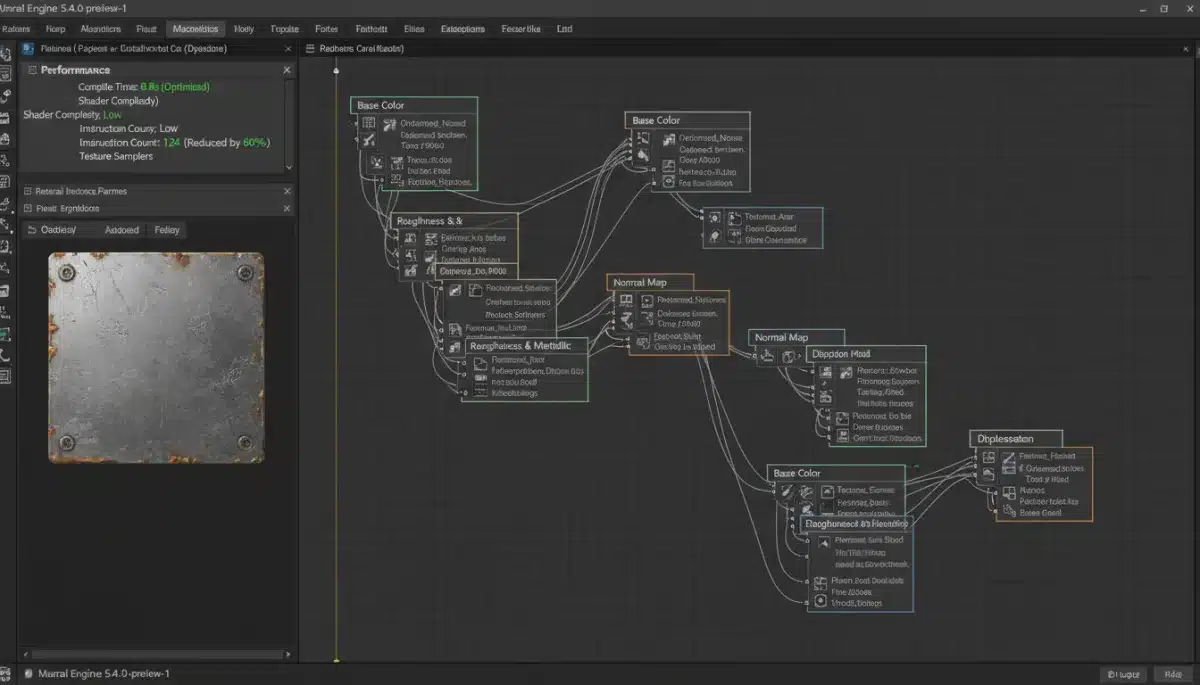
Material layers within Unreal Engine 5.4 provide a powerful abstraction that streamlines complex material setups. Instead of creating bespoke shaders for every minor surface variation, layers allow for modular construction.
This modularity not only simplifies the artist’s workflow but also centralizes shader logic, making it easier to manage and optimize. Reduced complexity translates directly to faster shader compilation times and improved runtime performance, a significant advantage for Unreal Engine.
- Combine common material properties into reusable layers.
- Utilize layer blending for seamless transitions between surfaces.
- Centralize texture sampling and parameter definitions within layers.
Optimizing with Material Instances
Material instances are a cornerstone of efficient rendering in Unreal Engine 5.4. They allow developers to modify material parameters without requiring a new shader compile, enabling vast visual diversity from a single parent material.
This approach minimizes the number of unique shaders the GPU needs to process, which is critical for maintaining high frame rates. For games targeting the competitive 2026 US market, reducing shader permutations is a non-negotiable aspect of performance.
The impact of proper material instancing extends beyond just shader performance; it also contributes to faster loading times and reduced memory usage. This holistic benefit makes it an indispensable technique for Unreal Engine.
Technique 2: Strategic Use of Shader Complexity View Modes and Profiling Tools
Effective shader optimization hinges on accurate identification of performance bottlenecks. Unreal Engine 5.4 provides robust tools, such as Shader Complexity View Modes and various profiling utilities, which are indispensable for Unreal Engine
The Shader Complexity View Mode visually highlights areas of high shader instruction count, allowing developers to pinpoint problematic regions in their scenes. This immediate visual feedback is crucial for iterative optimization, guiding artists and programmers to areas requiring attention.
Beyond visual feedback, profiling tools like the GPU Visualizer and Stat commands offer detailed metrics on shader execution times, memory usage, and draw calls. Analyzing this data is essential for making informed decisions about where to invest optimization efforts, ensuring maximum impact on 2026 game performance.
Analyzing Shader Complexity with View Modes
The Shader Complexity View Mode in Unreal Engine 5.4 is a developer’s best friend for identifying costly shaders. By visualizing instruction counts per pixel, it provides an immediate and intuitive understanding of where GPU resources are being overspent.
Areas highlighted in red or pink indicate extremely high instruction counts, demanding immediate attention. Developers should aim for a predominantly green or blue scene, signifying efficient shader execution. This visual cue is invaluable for rapid iteration and crucial for Unreal Engine.
Regularly checking this view mode throughout development ensures that new assets or changes do not inadvertently introduce performance regressions. This proactive monitoring is key for maintaining optimal performance leading up to a 2026 release.
Leveraging GPU Visualizer for Deep Dives
For a more granular understanding of shader performance, the GPU Visualizer in Unreal Engine 5.4 offers an in-depth breakdown of rendering passes and their associated costs. This tool is paramount for diagnosing complex performance issues that might not be immediately apparent from simpler view modes.
The GPU Visualizer allows developers to see exactly which shaders are consuming the most time on the GPU, isolate specific draw calls, and identify overdraw issues. This level of detail is critical for fine-tuning shaders to meet the stringent performance targets for 2026 games.
Understanding the data presented by the GPU Visualizer empowers developers to make targeted optimizations, rather than relying on guesswork. This precise approach is a hallmark of successful Unreal Engine strategies.
Technique 3: Implementing Custom LODs and Reducing Overdraw
The third essential technique for Unreal Engine involves smart management of Levels of Detail (LODs) and aggressive reduction of overdraw. These two aspects significantly influence GPU workload and overall frame rate.
Custom LODs for meshes and materials ensure that complex shaders are only rendered when necessary, at appropriate distances from the camera. This prevents the GPU from wasting cycles on rendering high-detail shaders for objects that are far away or occupy minimal screen space.
Reducing overdraw, which occurs when multiple transparent or complex surfaces are rendered on top of each other, is equally vital. Strategies such as careful mesh construction, appropriate culling, and efficient material blending can dramatically cut down on unnecessary pixel shading, enhancing 2026 game performance.
Intelligent LOD Management for Shaders and Meshes
Implementing custom LODs is not just about mesh complexity; it extends to shader complexity as well. Unreal Engine 5.4 allows for varying material quality based on LOD levels, ensuring that simpler shaders are used for distant objects.
This means that a highly detailed material with complex lighting calculations can be swapped for a simpler, cheaper version when an object is far from the camera. This dynamic adjustment is crucial for maintaining a consistent frame rate across diverse environments and is a key aspect of Unreal Engine.
Developers should work closely with artists to define appropriate LOD thresholds and material variations. This collaborative effort ensures that visual fidelity is preserved where it matters most, while performance is gained where it’s less noticeable to the player.
Minimizing Overdraw with Optimized Materials and Geometry
Overdraw is a silent killer of GPU performance, especially in scenes with numerous transparent effects, foliage, or complex particle systems. Each pixel rendered multiple times unnecessarily consumes valuable GPU cycles, directly impacting game performance.
To combat overdraw, developers should focus on creating opaque geometry whenever possible and using optimized transparent materials that minimize complex calculations. Alpha testing over alpha blending can often be a more performant choice for certain effects.
Furthermore, careful mesh construction and aggressive culling techniques, including occlusion culling and frustum culling, prevent objects from being rendered when they are not visible. These combined efforts are critical for achieving high frame rates and are fundamental to Unreal Engine.
Future-Proofing Games for 2026 with Unreal Engine 5.4
The landscape of game development is constantly evolving, with higher expectations for visual fidelity and performance. As we approach 2026, Unreal Engine becomes a cornerstone of successful game launches.
Developers must adopt a mindset of continuous optimization, integrating these techniques from the earliest stages of production. Proactive performance tuning, rather than reactive fixes, will define the success of upcoming titles.
The US market, in particular, is highly sensitive to performance issues. Games that offer a polished, high-performing experience will undoubtedly capture a larger audience and receive more favorable reviews, solidifying their place in the competitive gaming ecosystem.
The Role of Nanite and Lumen in Shader Optimization
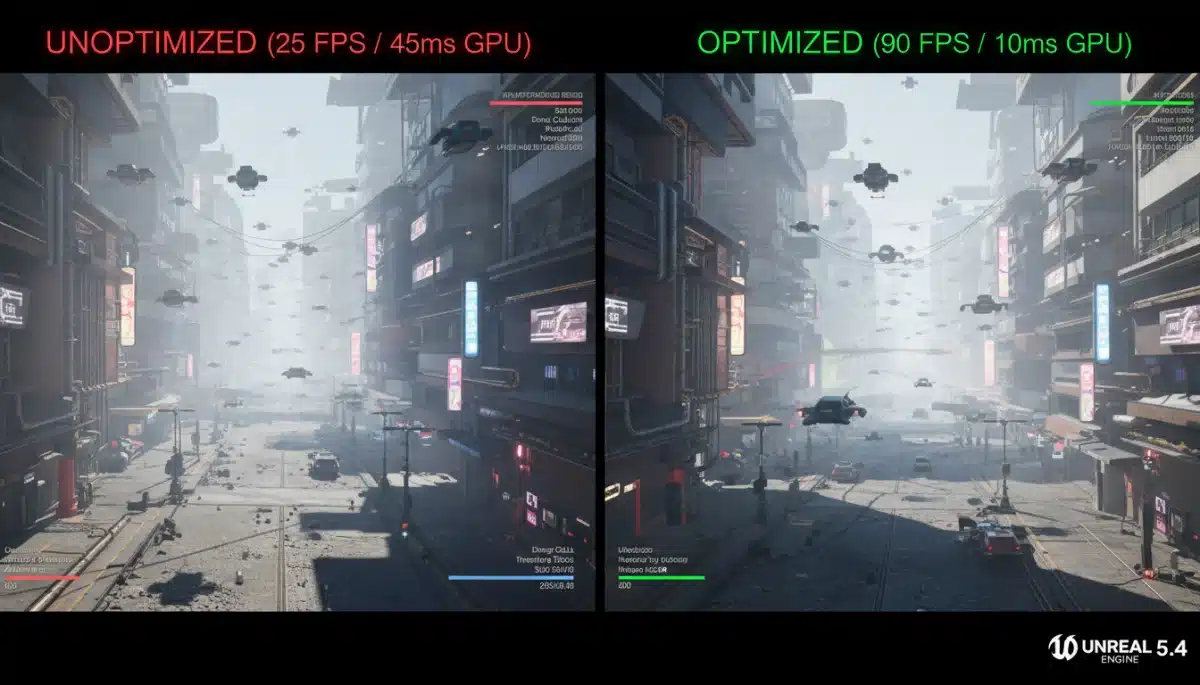
Unreal Engine flagship technologies, Nanite and Lumen, profoundly impact shader optimization strategies. While they offer unparalleled visual fidelity, understanding their interaction with traditional shader techniques is crucial for achieving optimal 2026 game performance.
Nanite, the virtualized micro-polygon geometry system, reduces the need for complex LODs on meshes, but its interaction with materials still requires careful consideration. Shaders applied to Nanite meshes must be efficient, as the sheer geometric detail can still lead to high instruction counts if not managed properly.
Lumen, the global illumination and reflections system, dynamically calculates lighting, which can be shader-intensive. Optimizing materials to interact efficiently with Lumen, by reducing complex lighting calculations within the material itself, is key to maintaining high frame rates. This is vital for Unreal Engine 5.4 Optimization.
Continuous Integration and Performance Monitoring
Integrating shader optimization into a continuous integration/continuous deployment (CI/CD) pipeline is an advanced but highly effective strategy. Automated performance tests can catch regressions early, saving significant development time and resources.
Regular performance monitoring, both during development and after release, provides invaluable data. Telemetry from shipped games can inform future updates and optimization patches, ensuring sustained performance for players in the US market.
This proactive and data-driven approach to Unreal Engine ensures that games remain performant throughout their lifecycle, adapting to new hardware and player expectations for 2026 and beyond.
| Key Technique | Brief Description |
|---|---|
| Material Layering | Combine materials for efficiency, reducing shader instruction counts. |
| Shader Profiling | Use view modes and tools to identify and address shader bottlenecks. |
| LODs & Overdraw | Implement custom Levels of Detail and minimize unnecessary pixel rendering. |
| Nanite & Lumen | Optimize materials for efficient interaction with UE5’s core rendering systems. |
Frequently Asked Questions About Unreal Engine
Shader optimization is crucial because it directly impacts frame rates and visual fidelity, key factors for player satisfaction. The competitive US market for 2026 titles demands games that run smoothly across diverse hardware, making efficient shader execution a top priority for developers.
Material Layers reduce shader complexity by allowing developers to combine multiple material properties into a single, more efficient shader. This modular approach minimizes instruction counts and simplifies material management, leading to faster compilation and improved runtime performance in Unreal Engine 5.4.
Unreal Engine 5.4 offers tools like Shader Complexity View Modes and the GPU Visualizer. These tools provide visual feedback and detailed metrics on shader instruction counts, execution times, and overdraw, enabling developers to pinpoint and address performance bottlenecks effectively.
Overdraw occurs when multiple pixels are rendered on top of each other unnecessarily, wasting GPU cycles. It can be reduced by using opaque geometry where possible, optimizing transparent materials, and employing culling techniques like occlusion and frustum culling to prevent rendering invisible objects.
While Nanite and Lumen enhance visuals, they require efficient shader interaction. Optimizing materials for Nanite meshes and ensuring materials interact efficiently with Lumen’s dynamic lighting calculations are crucial for maintaining high frame rates and overall Unreal Engine 5.4 Optimization.
Looking Ahead: Sustained Performance in the US Gaming Market
The insights from Unreal Engine highlight a clear path forward for developers. The continuous evolution of hardware and player expectations means that optimization is not a one-time task but an ongoing process.
As new technologies emerge and Unreal Engine itself receives updates, developers must remain vigilant in adapting their optimization strategies.
The success of 2026 titles in the highly competitive US market will largely depend on their ability to deliver a consistently smooth and visually stunning experience.