Optimizing Your Gaming Monitor for 2026: Complete Performance Guide
Advertisements
Latest developments in Gaming Monitors show continued innovation in refresh rates, OLED display technology, and adaptive synchronization features. Manufacturers are increasingly focusing on delivering smoother gameplay, improved color accuracy, and lower response times to meet the demands of competitive and immersive gaming experiences.
One of the biggest changes is the growing availability of high-refresh-rate OLED and Mini-LED monitors, with many premium models offering refresh rates of 240Hz and beyond. Improvements in HDR performance, motion clarity, and display efficiency are helping gamers achieve more responsive and visually impressive experiences across both PC and console platforms.
Looking ahead, consumers should monitor developments in DisplayPort and HDMI standards, next-generation OLED durability, AI-enhanced display features, and pricing trends. As gaming hardware continues to evolve, monitor technology will remain a critical factor in maximizing system performance and overall gaming enjoyment.
The Evolving Landscape of Gaming Monitors for 2026
The gaming hardware market is in a constant state of flux, with advancements in display technology pushing the boundaries of immersive experiences. As we approach 2026, understanding the key specifications of gaming monitors becomes paramount for both casual and competitive players.
Advertisements
This means delving into the intricacies of refresh rates, response times, and panel types, which collectively dictate the visual fidelity and responsiveness of your gaming setup. The optimal configuration is no longer a luxury but a necessity for staying competitive and truly enjoying modern titles.
Industry experts and manufacturers are continually innovating, introducing new standards and features designed to enhance performance and user experience. Keeping abreast of these developments is crucial for anyone serious about Gaming Monitor.
Demystifying Refresh Rates: The Core of Smooth Gameplay
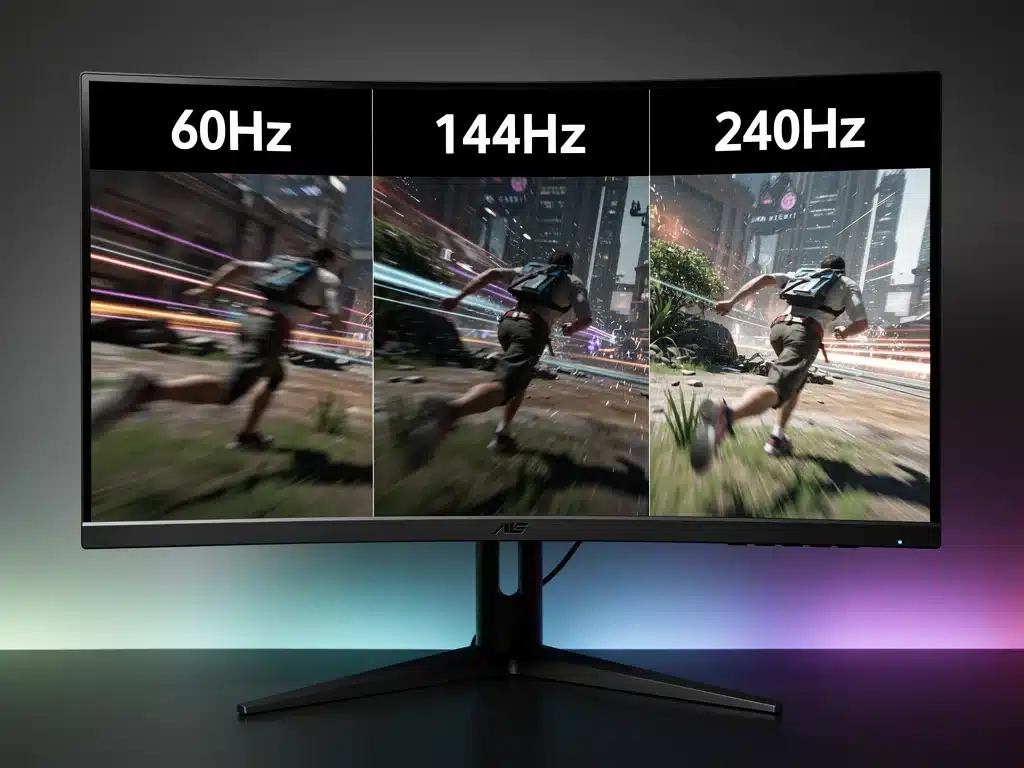
Refresh rate, measured in Hertz (Hz), represents how many times per second a monitor can redraw its screen image. A higher refresh rate translates directly into smoother motion and a more fluid visual experience, which is particularly critical in fast-paced gaming genres.
For 2026, the baseline for competitive gaming monitors is increasingly shifting from 144Hz to 240Hz and even higher, with 360Hz displays becoming more accessible. This upward trend is driven by the increasing capabilities of modern GPUs and the demand for even greater visual clarity during intense gameplay.
Understanding your system’s capabilities and matching them to an appropriate refresh rate is a fundamental step in Gaming Monitor. It ensures you are not bottlenecking your powerful graphics card with a slow display.
The Impact of High Refresh Rates
High refresh rates significantly reduce motion blur and ghosting, making it easier to track fast-moving objects and opponents in games. This visual clarity provides a tangible competitive advantage, allowing for quicker reaction times and more precise aim.
Beyond competitive advantages, a higher refresh rate simply makes the overall gaming experience more enjoyable and less fatiguing for the eyes. The seamless motion reduces strain, allowing for longer gaming sessions without discomfort, a key factor in long-term engagement.
The move towards higher refresh rates is also influencing game development, with many titles now designed to take full advantage of these capabilities. Gamers are actively seeking monitors that can deliver these enhanced experiences, highlighting the importance of refresh rate in Gaming Monitor.
Response Time Explained: Minimizing Ghosting and Input Lag
Response time refers to the speed at which a pixel can change from one color to another, typically measured in milliseconds (ms). A lower response time is highly desirable for gaming, as it minimizes motion blur, ghosting, and smearing effects, particularly evident in fast-moving scenes.
In 2026, gaming monitors commonly feature response times of 1ms Grey-to-Grey (GtG), with some cutting-edge displays achieving even lower figures. This rapid pixel transition is crucial for maintaining image clarity when objects move quickly across the screen, ensuring every detail remains sharp.
The interplay between response time and refresh rate is critical; a monitor with a high refresh rate but slow response time will still suffer from ghosting. Therefore, balancing these two specifications is key for Gaming Monitor.
GtG vs. MPRT: Understanding the Metrics
The two most common metrics for response time are Grey-to-Grey (GtG) and Moving Picture Response Time (MPRT). GtG measures how long it takes for a pixel to transition from one shade of grey to another, a more practical measure for real-world gaming.
MPRT, on the other hand, measures how long a pixel is visible on screen, often associated with backlight strobing technologies designed to reduce perceived motion blur. While MPRT can make motion appear clearer, it often comes at the cost of brightness and can introduce flicker.
For gamers, GtG is generally the more important specification to consider for raw pixel responsiveness, especially when comparing different monitors. Understanding these distinctions is vital for making informed decisions when Gaming Monitor.
The pursuit of minimal response times is a continuous effort by manufacturers, as even a few milliseconds can impact competitive play. Technologies like overdrive settings help accelerate pixel transitions, though aggressive overdrive can sometimes introduce inverse ghosting or overshoot artifacts.
Panel Types: IPS, VA, and TN in the Modern Era
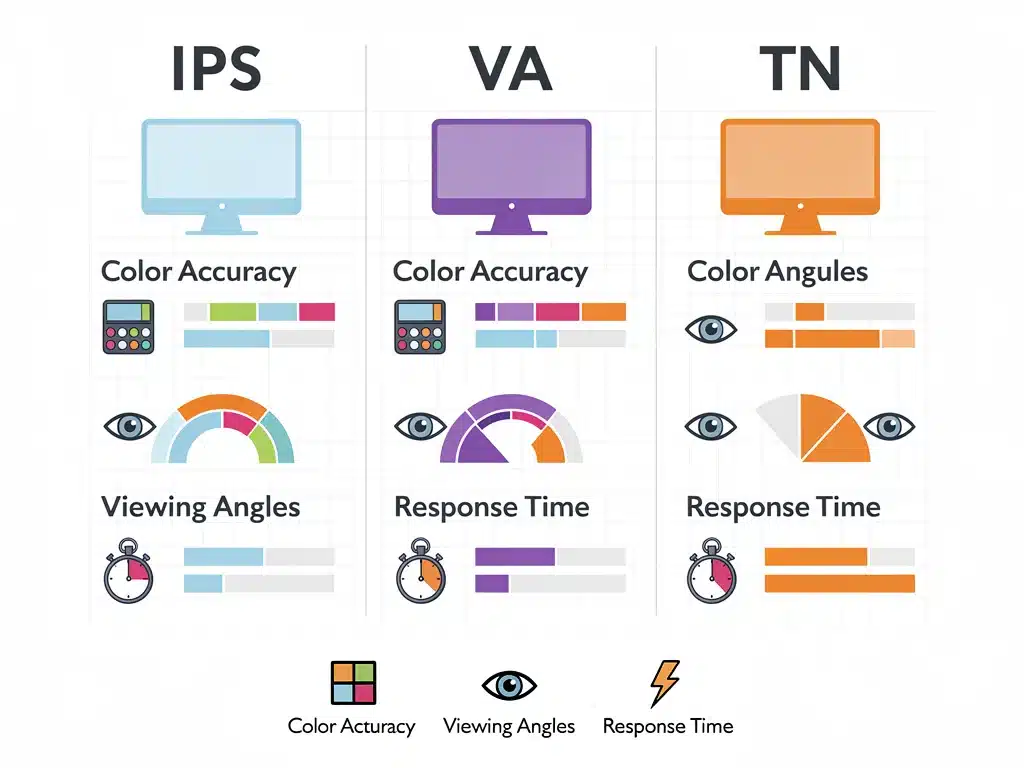
The choice of panel technology significantly influences a monitor’s image quality, viewing angles, color accuracy, and, crucially, its response time. The three primary panel types are In-Plane Switching (IPS), Vertical Alignment (VA), and Twisted Nematic (TN), each with distinct characteristics.
For 2026, IPS panels continue to dominate the premium segment due to their superior color reproduction and wide viewing angles, making them excellent for both gaming and content creation. Recent advancements have significantly improved their response times, making them viable for competitive gaming.
VA panels offer a strong balance with excellent contrast ratios, providing deep blacks that enhance immersion, though historically they have had slower response times. TN panels, while offering the fastest response times and highest refresh rates, often compromise on color accuracy and viewing angles.
IPS Panels: Color Fidelity Meets Speed
Modern IPS panels have largely overcome their traditional drawback of slower response times. Many gaming-focused IPS displays now boast 1ms GtG response times, making them incredibly versatile for gamers who demand both visual quality and competitive performance.
Their wide viewing angles ensure consistent color and brightness regardless of your viewing position, which is beneficial for multi-monitor setups or when sharing the screen. The vibrant and accurate colors enhance the visual appeal of games, bringing virtual worlds to life with stunning detail.
The continuous refinement of IPS technology makes it a top contender for anyone serious about Gaming Monitor, offering a premium experience without significant compromises.
The evolution of IPS technology is a testament to the industry’s commitment to delivering high-performance displays. Gamers no longer have to choose between speed and visual quality, as IPS now offers both in a compelling package.
VA Panels: Deep Blacks and Immersive Contrast
VA panels excel in contrast, delivering significantly deeper blacks compared to IPS or TN panels. This high contrast ratio creates a more immersive visual experience, particularly in games with dark environments where subtle details can easily be lost on other panel types.
While historically slower, newer VA panels have made strides in improving response times, though they may still lag slightly behind the fastest IPS and TN options. For casual gamers or those prioritizing cinematic visuals over absolute competitive edge, VA remains a strong choice.
Curved VA panels are also popular, leveraging their excellent contrast to create a more enveloping field of view. This design choice further enhances immersion, making VA an attractive option for Gaming Monitor with a focus on atmosphere.
Adaptive Sync Technologies: G-Sync and FreeSync
Adaptive Sync technologies, primarily NVIDIA’s G-Sync and AMD’s FreeSync, synchronize the monitor’s refresh rate with the GPU’s frame rate. This eliminates screen tearing and reduces stuttering, providing a much smoother and more enjoyable gaming experience, especially when frame rates fluctuate.
For 2026, both G-Sync and FreeSync continue to be essential features for gaming monitors, with broader adoption across various price points. These technologies ensure that the visual output remains fluid and artifact-free, regardless of the game’s demands on your hardware.
Selecting a monitor compatible with your graphics card’s adaptive sync technology is a crucial consideration for Gaming Monitor. It’s a fundamental component of a seamless gaming setup.
The Benefits of Adaptive Sync Integration
Eliminating screen tearing means that frames are displayed completely and correctly, without the distracting horizontal lines that can appear when the GPU and monitor are out of sync. This visual consistency is vital for maintaining focus and immersion in competitive gaming.
Reduced stuttering ensures that gameplay remains fluid even when frame rates drop below the monitor’s maximum refresh rate. Instead of noticeable hiccups, the experience remains smooth, adapting to the GPU’s output in real-time, which is a major advantage.
The widespread integration of adaptive sync technologies into monitors and graphics cards means that gamers have more choices than ever before. This competition drives innovation and makes these advanced features more accessible, benefiting all users focused on Gaming Monitor.
Connectivity and HDR: Future-Proofing Your Display
As gaming technology advances, so do the demands on monitor connectivity. For 2026, DisplayPort 1.4 and HDMI 2.1 are the standards to look for, as they support higher resolutions, refresh rates, and HDR content, ensuring your monitor can handle future hardware upgrades.
High Dynamic Range (HDR) significantly enhances visual fidelity by offering a wider range of colors, brighter highlights, and deeper shadows compared to Standard Dynamic Range (SDR). This results in a more realistic and impactful visual experience, bringing games to life with stunning contrast and detail.
Investing in a monitor with robust connectivity and HDR capabilities is crucial for future-proofing your gaming setup. It ensures that your display can keep pace with evolving graphics standards, a key aspect of Gaming Monitor.
The Importance of HDR Standards
Not all HDR implementations are created equal. VESA DisplayHDR certifications (e.g., DisplayHDR 400, 600, 1000) provide a reliable indicator of a monitor’s HDR performance, outlining minimum standards for brightness, contrast, and color gamut.
For a truly impactful HDR experience, look for monitors with higher DisplayHDR ratings, ideally DisplayHDR 600 or above, as these offer a noticeable improvement over entry-level HDR 400. The difference in visual quality can be substantial, especially in HDR-enabled games.
Understanding these HDR standards helps in making an informed purchase, ensuring that your investment delivers on the promise of enhanced visuals. This attention to detail is paramount for anyone focused on Gaming Monitor, maximizing every aspect of their display.
Ergonomics and Design: Comfort for Extended Sessions
Beyond technical specifications, the physical design and ergonomic features of a gaming monitor play a significant role in overall user experience. Adjustable stands, including height, tilt, swivel, and pivot options, are essential for maintaining comfort during long gaming sessions, preventing strain and fatigue.
A well-designed monitor stand allows for optimal viewing angles, reducing reflections and ensuring a comfortable posture. This attention to ergonomics contributes to both physical well-being and sustained gaming performance, making it an often-overlooked but crucial aspect of a gaming setup.
Furthermore, features like blue light filters and flicker-free technology help reduce eye strain, which is particularly important for gamers who spend many hours in front of their screens. Prioritizing these features is an integral part of Gaming Monitor for long-term enjoyment.
The Value of Thoughtful Design
Sleek, minimalist designs with thin bezels not only look aesthetically pleasing but also enhance immersion by minimizing distractions, especially in multi-monitor configurations. Cable management solutions integrated into the stand help keep your desk tidy and organized.
The overall build quality and materials used also contribute to the monitor’s durability and premium feel. A robust and stable stand prevents wobbling, ensuring a consistent and distraction-free viewing experience, which is crucial for competitive play.
Considering the complete package—technical prowess combined with thoughtful design and ergonomics—is key to achieving a truly optimized gaming experience. These elements collectively contribute to Gaming Monitor, ensuring that every aspect supports peak performance and comfort.
Choosing the Right Gaming Monitor for Your Needs
The ideal gaming monitor for 2026 is not a one-size-fits-all solution; it depends heavily on individual preferences, gaming habits, and budget. Competitive esports players might prioritize the highest refresh rates and lowest response times, often opting for TN or fast IPS panels.
Those who enjoy visually rich, single-player experiences may lean towards IPS or VA panels for their superior color accuracy, contrast, and wider viewing angles, even if it means a slight compromise on raw speed. The balance between these factors is a personal decision.
Budget constraints also play a significant role, with a wide range of options available across different price points. Understanding your priorities and how each specification contributes to your desired experience is fundamental for Gaming Monitor effectively.
Tailoring Your Monitor Choice
- Competitive Gamers: Focus on 240Hz+ refresh rates, 1ms GtG response times, and adaptive sync (G-Sync/FreeSync) for minimal input lag and maximum fluidity.
- Immersive Gamers: Prioritize IPS or VA panels for vibrant colors and deep contrast, with good refresh rates (144Hz+) and low response times (under 4ms GtG).
- Content Creators/Hybrid Users: Look for IPS panels with excellent color accuracy (e.g., DCI-P3 coverage), decent refresh rates, and ergonomic features.
Ultimately, the goal is to find a monitor that complements your gaming style and hardware, providing a seamless and enjoyable experience. Researching reviews, comparing specifications, and considering your long-term needs will guide you toward the best choice for Gaming Monitor.
| Key Feature | Importance for 2026 |
|---|---|
| Refresh Rate | Crucial for fluid motion, 240Hz+ becoming standard for competitive play. |
| Response Time | Minimizes ghosting; 1ms GtG is the benchmark for clear, sharp images. |
| Panel Type | IPS offers best balance of color and speed; VA for contrast, TN for raw speed. |
| Adaptive Sync | Essential for eliminating tearing and stuttering, ensuring smooth gameplay. |
Frequently Asked Questions About Gaming Monitor Optimization
For Gaming Monitor, the most important factor depends on your primary use. For competitive gaming, a high refresh rate (240Hz+) and low response time (1ms GtG) are paramount. For immersive single-player experiences, panel type (IPS/VA) for color and contrast might take precedence, balanced with good speed.
Refresh rate dictates how smoothly motion appears on screen, with higher Hz meaning smoother visuals. Response time determines how quickly pixels change color, directly impacting ghosting and motion blur. Both are crucial for Gaming Monitor, as a high refresh rate is ineffective without a fast response time.
In 2026, IPS panels are generally considered the best all-around choice for Gaming Monitor, offering excellent color accuracy, wide viewing angles, and increasingly competitive response times. VA panels excel in contrast, while TN panels still offer the absolute fastest response times at the expense of color quality.
Yes, HDR is becoming increasingly important for Gaming Monitor. It provides a significantly wider range of colors, brighter highlights, and deeper shadows, leading to a more realistic and immersive visual experience in compatible games. Look for VESA DisplayHDR 600 or higher for a noticeable improvement.
Adaptive sync technologies like G-Sync and FreeSync are vital for Gaming Monitor. They synchronize the monitor’s refresh rate with the GPU’s frame rate, eliminating distracting screen tearing and reducing stuttering, thus ensuring a consistently smooth and fluid visual experience during gameplay.
Perspectives for Gaming Monitor Evolution
The ongoing evolution of gaming monitors promises even more refined performance and immersive experiences.
We anticipate further advancements in panel technologies, pushing the boundaries of refresh rates and response times while simultaneously enhancing color accuracy and contrast.
The integration of AI-driven upscaling and real-time image optimization within monitors themselves could also become more prevalent, offloading some processing from the GPU.
These developments will continue to shape how gamers approach Gaming Monitor, always seeking the edge in visual fidelity and responsiveness.